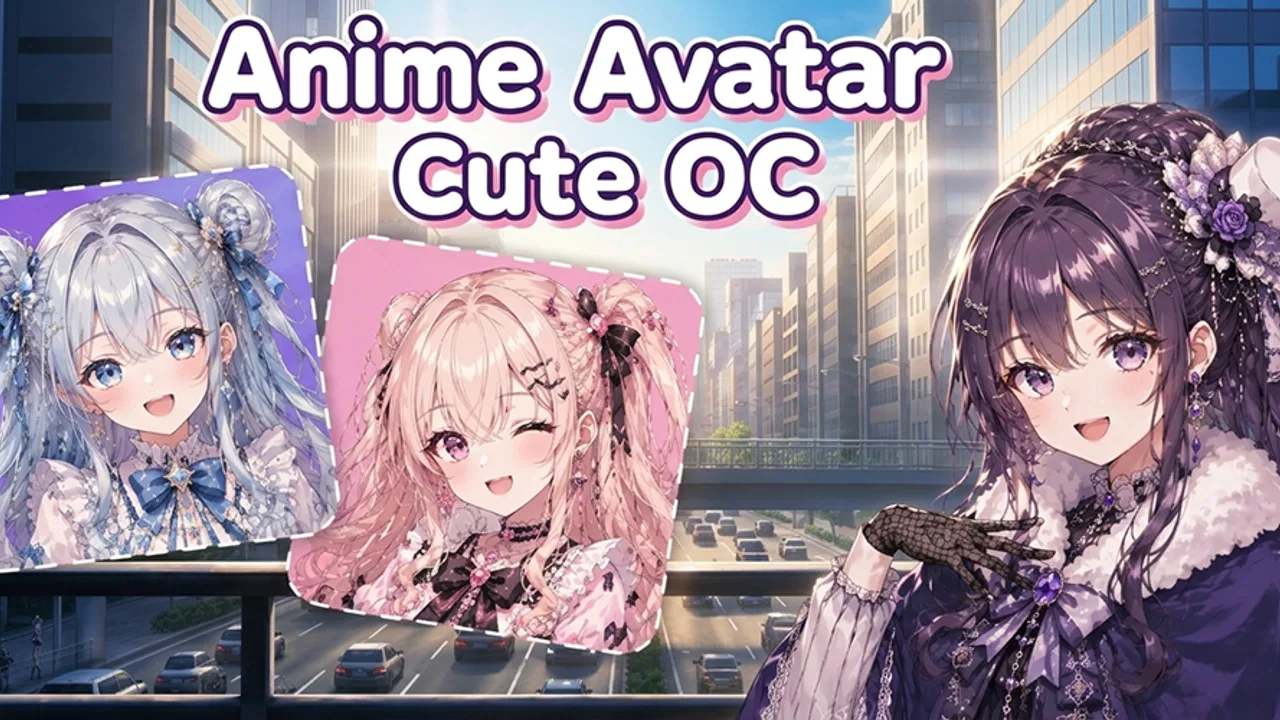
Anime Avatar: Cute OC
- 3.6
- Rating
- 500.00K
- Installs
- Free
- Price

 Analysis by App-foxy
I spent time with Anime Avatar: Cute OC as a quick character-creation app, and its appeal is easy to understand: it lets me build a cute anime-style avatar without asking me to learn a complicated drawing program. The experience is aimed at small creative decisions—choosing a look, adjusting the character, and shaping an original character concept through accessible customization tools.
That simplicity is the main reason I would recommend it to someone who wants a profile image, a visual reference for an original character, or a relaxed way to experiment with anime-inspired designs. It is not the kind of app I would open expecting professional illustration controls. Instead, I see it as a lightweight starting point for people who enjoy arranging visual elements and want results quickly.
How the character-building workflow feels in everyday use
The most useful way to approach the app is to treat each avatar as a small design exercise rather than trying to perfect everything immediately. I begin with the broad impression I want: soft and friendly, dramatic, playful, mysterious, or more unusual. Only after that do I focus on the details. This prevents the common problem of changing individual features randomly and ending up with a character that looks polished but lacks a clear identity.
You May Also Like

 Blood Strike: 2.5 Anniversary
Blood Strike’s Loadouts Turn Every Drop Into a Tactical Gamble
A close look at Blood Strike’s custom loadouts: how fast access to signature weapons reshapes its battle royale rhythm, rewards preparation, and narrows the gap between fights.

 Pandora - Music & Podcasts
Pandora’s Music Is Easy to Start, but Harder to Recover
Pandora’s strength is its low-effort path from a seed to a station. Its weak spot is how much confidence it asks you to place in connection, setup, and quiet recovery.

 8 Ball Pool
 Is Built on Rivalries, Rematches, and Routine
A close look at the rivalries, rematches, shared routines, and unanswered safety questions that turn a quick pool match into a persistent mobile community.

 Samsung Music
’s Quiet Strength Is Playing What You Already Own
Its reach comes less from spectacle than from dependable access to a personal library. That simplicity is both the app’s strongest retention engine and its ceiling.

 AccuWeather: Weather Radar
AccuWeather Review: A Quick, Clear Forecast for Everyday Decisions
For everyday plans, the best forecast is the one you can understand quickly. AccuWeather makes rain timing, radar, and local conditions easy to act on, with a few trade-offs.

 Hill Climb Racing
Why Hill Climb Racing Still Turns Crashes Into One More Run
A tiny car, a bumpy hill and one more upgrade: Hill Climb Racing keeps resurfacing because its simple chaos makes every near-miss feel personal.
More From Our News Desk



For a first session, I recommend creating a simple baseline character. Pick a general appearance, make a few obvious adjustments, and stop before endlessly fine-tuning. The goal is to learn how the customization tools behave. Once I understand which choices have the biggest visual impact, later avatars become much faster to assemble.
This approach works particularly well for someone who needs a temporary profile picture. Imagine that I want a new image for a messaging account before the weekend. I can make one recognizable character, test a few combinations, and choose the version that still looks clear at a small size. The important detail is not how many changes I make, but whether the face and overall silhouette remain readable when reduced.
I also found the app useful for planning original characters before writing about them. A visual draft can reveal whether two ideas feel too similar, whether a color combination matches the character’s personality, or whether the design needs one strong identifying feature. I would not treat the result as a finished illustration, but it can serve as a practical reference while developing a story, role-playing character, social profile, or personal collection of designs.
The developer, AthenaHotC, has positioned this as a beauty and avatar-focused app rather than a full art studio. That distinction matters. The workflow is about choosing and combining available visual options, not drawing every line manually. If you enjoy making decisions within a prepared creative system, the format feels approachable. If you want complete control over anatomy, lighting, poses, or brushwork, you will probably reach its boundaries quickly.
Start with a repeatable design order
My preferred order is to establish the face and general mood first, then work through hair and other visible styling choices, and only afterward worry about small refinements. This creates a repeatable habit that saves time. When I start with tiny details, I often have to undo them after changing the main appearance. A consistent order makes the process less tiring and makes it easier to compare different versions of the same character.
Another useful habit is to change one visual area at a time. If I alter several elements together, I cannot tell which choice improved the design. By making controlled changes, I can identify the combinations that actually work. This is especially helpful when creating a set of related avatars, because I can keep the overall identity consistent while varying one feature for each version.
The app is also better suited to short, focused sessions than to a long uninterrupted design marathon. I get more useful results when I make a character, pause, and look at it again later. A design that feels exciting after many consecutive adjustments may look cluttered once I return with fresh eyes. That pause is not a feature of the software, but it is one of the best ways to use a simple avatar editor well.
Settings and device expectations worth checking
Anime Avatar: Cute OC is free, which makes it easy to try without committing money first. It is listed for Everyone, so its basic audience is broad, including casual users and younger people who want to make anime-style avatars. Even so, I would still use ordinary judgment when deciding whether a child should use any creative app independently, particularly when a device is shared or connected to other services.
The app requires Android 9 or later. That is an important practical check before installing it on an older phone or tablet. On a compatible device, I would also make sure the operating system is behaving normally and that there is enough room for a smooth creative session. I would not assume that a newer operating system automatically means a better result, because the experience can still vary with screen size, touch responsiveness, and general device performance.
When I review an avatar, I check it in the same display conditions where I expect to use it. A design that looks balanced on a large phone screen may lose small details in a circular profile image. I therefore look at the face, hair outline, and strongest color areas at a reduced size. This is a concrete advantage of checking early: I can simplify the design before becoming attached to details that will barely be visible elsewhere.
The current version is 1.1.2. I would keep the app updated through the normal store process, but I would also avoid building an important one-time project around a single session. For a character I care about, I would save or capture the finished result as soon as it looks right, using the ordinary options available on my device. That is a sensible habit for any small creative tool, especially when a design may be difficult to recreate exactly.
One setting-related trade-off is the balance between convenience and consistency. If I am making several avatars, I want to keep my choices organized mentally: one character may use a warm, gentle palette while another uses sharper contrasts. Without a written plan or a small reference note, repeated experimentation can become inconsistent. The app makes quick creation approachable, but the user still has to supply the design discipline.
Faster patterns for repeat users
After the first few attempts, I stop treating every avatar as a completely new project. I create a visual template in my head: a basic face style, a preferred mood, and a small group of combinations that already work together. From there, I change only the elements that define the new character. This is much quicker than starting from an unrelated design each time, and it helps a group of characters feel like they belong together.
A useful pattern is to make three deliberately different drafts before choosing a final direction. One can be close to the original idea, one can exaggerate the mood, and one can simplify the design. The point is not to produce three finished avatars. It is to discover which part of the concept really matters. Sometimes the exaggerated version reveals a stronger identity, while the simplified one works better as a small profile picture.
I also recommend separating “identity” choices from “decoration” choices. Identity choices are the features I want people to remember. Decoration choices are the details that make the avatar attractive but are not essential. If the image becomes busy, I remove decoration first. This gives me a cleaner result without losing the character’s main idea.
For social profiles, I would design with the intended crop in mind from the beginning. Keep the most important visual information near the center, and avoid relying on details close to the edges. For a story reference, I can be more adventurous because the image may be viewed at a larger size. For a messaging icon, clarity wins. The same avatar can need different treatment depending on its final use.
Another efficient workflow is to create a “safe” version before experimenting. I first make a balanced avatar that I would be happy to keep. Then I try unusual combinations without worrying about losing the original direction. This reduces the frustration of exploring bold ideas and gives me a reliable fallback. It is a small habit, but it makes the creative process feel less wasteful.
The app’s straightforward nature also makes it suitable for collaborative idea sessions. I can ask a friend to choose between two moods or to suggest which version feels more memorable. That does not turn the app into a social platform; it simply gives the creation process a useful outside perspective. A second opinion is especially valuable when I have been staring at the same face and no longer notice that the design has become too complicated.
Where the simple format reaches its limits
The biggest limitation is the same feature that makes the app approachable: I am working inside a prepared customization system. I can make a character feel personal through combinations, but I do not have the freedom of a drawing application where every proportion, pose, line, and expression can be built from scratch. Users who already work with digital art tools may find the creative ceiling low.
It is also not the best choice when the project depends on highly specific visual storytelling. If I need several exact poses, a detailed scene, consistent perspective, or carefully controlled lighting, I would move to a more advanced illustration or character-design tool. This app can help me decide what a character should look like, but it is not a replacement for a complete production workflow.
There is a similar limitation for users who want precise continuity across many characters. A repeatable personal method can improve consistency, but the app itself should not be treated as a professional asset-management system. For a large cast, I would keep my own notes about defining traits and save finished references clearly. That extra organization becomes necessary once the project grows beyond casual avatar making.
I would also skip it if my main goal is realistic portrait creation. Its appeal is rooted in cute anime-inspired presentation and original-character customization. Someone looking for natural photography edits, realistic retouching, or a conventional beauty filter will likely be happier with a different kind of beauty app. The category may overlap broadly, but the creative purpose is very different.
The public response suggests a mixed but meaningful level of interest: the app has an average rating of 3.5 from roughly 705 ratings and has passed 500K installs. I read that as a reason to try it with realistic expectations rather than as a guarantee that it will suit every device or every creative style. Its free price lowers the risk of testing it, while the moderate rating is a reminder to judge the actual workflow for myself.
Compared with a general-purpose avatar maker, this app feels more focused on anime-style original characters. Compared with a full digital art app, it is much easier to approach but far less flexible. Compared with a simple photo editor, it offers a more imaginative starting point because I am constructing a character instead of modifying a real face. Those are the trade-offs I would use when deciding whether to install it.
Who will get the most from it
I think it is a good fit for beginners, anime fans, casual profile-image creators, and writers who want a quick visual sketch of an original character. It can also work for someone who enjoys collecting different avatar concepts without wanting to study drawing software. The low barrier matters here: I can focus on taste and experimentation instead of technical controls.
It is less suitable for professional illustrators, users who need export-oriented production tools, or anyone expecting a deep character pipeline. I would also be cautious about recommending it as the only tool for a long-form project. It can be the first step in a workflow, but serious projects benefit from a separate place for notes, references, revisions, and final artwork.
For a younger or first-time creator, the strongest benefit is immediate feedback. A choice produces a visible change, which makes it easier to understand how style is built from individual elements. For an experienced user, the value is different: the app becomes a fast sketching space for testing combinations before investing time in more detailed artwork.
The app is free and carries an Everyone content rating, so it is easy to share as a low-risk creative suggestion. Still, I would explain that “easy” does not mean “automatic.” The best results come from making deliberate choices, checking the avatar at its intended size, and saving versions before experimenting. Those habits matter more than simply tapping through options quickly.
My verdict after building with it
Anime Avatar: Cute OC succeeds as a focused, approachable way to create cute anime-style avatars and original-character concepts. I like it most when I need a quick visual idea, a profile image, or a starting reference that does not require drawing skills. The free entry point makes experimentation comfortable, and the current release, version 1.1.2, is easy to place in a simple everyday workflow.
My recommendation comes with a clear boundary. I would choose this over a complex art program for a fast avatar, but I would choose a full illustration tool for detailed character sheets, exact poses, or polished finished artwork. The app is strongest when I respect its intended scale: quick, visual, playful creation rather than complete digital production.
If you enjoy anime-inspired design and want to build characters by combining accessible choices, I think it is worth trying. Begin with one uncomplicated avatar, check how it reads as a small image, save a version you like, and then experiment from that safe starting point. That workflow lets the app’s simplicity work in your favor instead of making its limits frustrating.
In my experience, the real strength is not endless customization but the speed with which an idea becomes visible. For casual creators and OC beginners, that can be enough to turn a vague concept into something memorable. For advanced artists, it is best viewed as a quick concept tool—useful at the beginning, but not the final destination.
FAQs for Anime Avatar: Cute OC
01What are the main features of Anime Avatar: Cute OC?
Anime Avatar: Cute OC allows users to create and customize their own anime-style avatars. With a wide range of hairstyles, facial features, clothing, and accessories, users can craft unique characters. The app also offers themed backgrounds and stickers to enhance the avatars, making it perfect for fans of anime art and customization.
02Is Anime Avatar: Cute OC free to use?
Anime Avatar: Cute OC is free to download and offers a variety of customization options at no cost. However, it includes in-app purchases for additional features and premium content, such as exclusive outfits and accessories. Users can choose to enhance their experience by purchasing these extras.
03Can I share my creations from Anime Avatar: Cute OC on social media?
Yes, Anime Avatar: Cute OC allows you to share your customized avatars directly to social media platforms. The app includes options for exporting your creations as images, making it easy to upload to Instagram, Facebook, and other social networks. This feature is perfect for showcasing your artistic flair.
04Does Anime Avatar: Cute OC require an internet connection?
While Anime Avatar: Cute OC can be used offline for creating and customizing avatars, an internet connection is needed for accessing certain features. These include downloading additional content, making in-app purchases, and sharing avatars on social media. It's recommended to connect to Wi-Fi for a seamless experience.
05Is Anime Avatar: Cute OC suitable for children?
Anime Avatar: Cute OC is designed to be family-friendly, with content suitable for children and teens. The app's interface is intuitive and easy to navigate, making it accessible for younger users. Parental guidance is advised for in-app purchases, as these can lead to additional costs.
Pros
- Highly customizable avatar options.
- Intuitive and user-friendly interface.
- Frequent updates with new features.
- Lightweight app with fast performance.
- No intrusive ads during use.
Cons
- Limited free customization items.
- Occasional glitches with saving avatars.
- Requires internet for full functionality.
- In-app purchases can be pricey.
- Some features need improvement.

Anime Avatar: Cute OC
Gallery